











SysInfo Mac Hotmail Backup Tool
- Demo
- 4.51
- V25.4.0
Download for Mac
View an ad to download for free
Backup, Export, and Migrate Hotmail Emails on Mac with Complete Mailbox Preservation
SysInfo Mac Hotmail Backup Tool is a powerful email backup and migration solution developed for macOS users who want to secure, transfer, and manage their Hotmail and mailbox data without complications. The application is designed to help individuals, businesses, administrators, and IT professionals create reliable copies of email content while preserving important information such as sender details, recipient information, subject lines, timestamps, attachments, and folder hierarchy. By providing multiple backup and export options, the utility helps users maintain access to critical communication records and reduce the risk of accidental data loss.
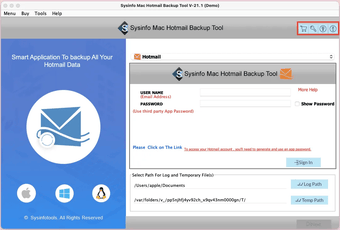
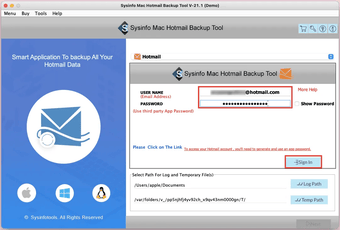
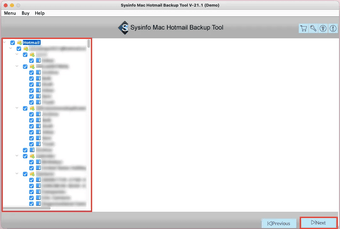
The software offers a straightforward process that allows users to connect their Hotmail account and perform mailbox backup operations directly from a Mac system. Once connected, the application scans mailbox content and displays available folders for selection. Users can choose specific folders or process an entire account depending on their requirements. This flexibility makes the utility suitable for both small personal mailboxes and larger business environments containing years of correspondence.
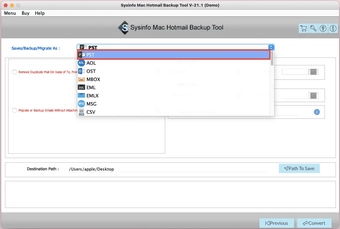
A major advantage of the application is its support for multiple saving formats. Users can export mailbox data into widely accepted file types such as PST, PDF, MBOX, EML, MSG, CSV, HTML, and additional formats commonly used for storage, migration, and documentation purposes. This versatility simplifies the process of moving information between different email clients and platforms while ensuring long-term accessibility of important messages.
For organizations planning mailbox migration projects, the software provides options to transfer email content directly to various email services. Instead of performing several manual steps, users can move mailbox data through a guided workflow that helps streamline migration tasks. This capability can save significant time when handling large quantities of messages and folders.
The tool includes advanced filtering features that allow selective processing of mailbox content. Users can apply date-range filters to export emails from a specific period rather than backing up an entire account. Such functionality is useful when creating project-specific archives, meeting compliance requirements, or reducing the size of exported data. Additional customization settings provide greater control over the final output and help organize exported information according to individual preferences.
Maintaining mailbox structure is an important consideration during any backup operation. The software preserves the original folder arrangement and email attributes throughout the process, ensuring that exported content remains organized and easy to access after completion. Attachments associated with messages are retained as part of the backup, helping users preserve complete communication records without losing supporting files.
The application also includes features that improve efficiency during large-scale operations. Users can avoid unnecessary duplication by excluding repeated items from the backup process. This helps optimize storage utilization and keeps exported data cleaner and easier to manage. The software is designed to process multiple mailbox items efficiently while maintaining stability during lengthy operations.
A user-friendly interface makes the program accessible to both experienced administrators and individuals with limited technical knowledge. Clear navigation, organized options, and guided workflows help simplify mailbox backup and migration tasks. Users can perform complex operations without requiring extensive configuration or specialized expertise.
Compatibility across modern macOS environments ensures that the software can be used on a wide range of Apple devices. Its design focuses on reliability, performance, and data integrity, helping users protect valuable mailbox information throughout every stage of the backup process.
Loading…
App specs
License
Demo
Version
25.4.0
Latest update
Platform
Mac
OS
macOS 10.15
Language
English
Size
307.42 MB
Developer
- SysInfoTools
- More programs (36)
SysInfo Mac Hotmail Backup Tool
- Demo
- 4.51
- V25.4.0
Download for Mac
View an ad to download for free
User reviews about SysInfo Mac Hotmail Backup Tool
Have you tried SysInfo Mac Hotmail Backup Tool? Be the first to leave your opinion!
Add reviewTop downloads Utilities & Tools for Mac
Top downloads Utilities & Tools for Mac
Top downloads Utilities & Tools for Mac
Related topics about SysInfo Mac Hotmail Backup Tool
Latest articles

Do we want to try the new Siri AI? This way we can install iOS 27

Dead by Daylight celebrates its tenth anniversary in style

Pokémon Scarlet and Violet: Cinderace 7-Star raid is live now

Disney releases a new Toy Story short for the best possible reason: helping sick children

Wuthering Waves adds Lucilla in Version 3.4: banner now live
Laws concerning the use of this software vary from country to country. We do not encourage or condone the use of this program if it is in violation of these laws. Softonic may receive a referral fee if you click or buy any of the products featured here.